Delve into the world of Sage Enterprise Intelligence, where data meets strategy in a seamless blend of innovation and efficiency. As businesses navigate the complexities of decision-making, Sage Enterprise Intelligence emerges as a beacon of insight, offering a unique perspective on the realm of business intelligence.
Unravel the layers of functionality and integration that define Sage Enterprise Intelligence, and witness firsthand the transformative impact it can have on organizational success.
Overview of Sage Enterprise Intelligence
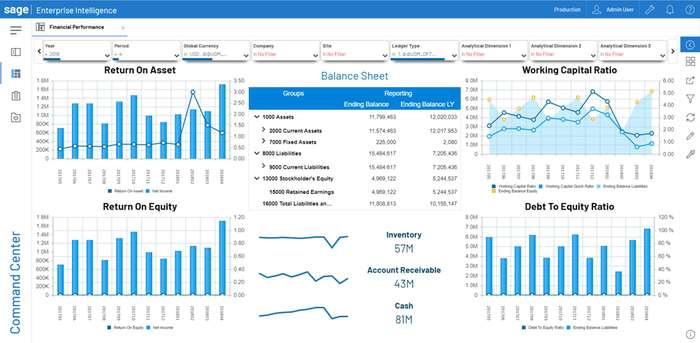
Sage Enterprise Intelligence is a robust business intelligence solution designed to help organizations streamline their reporting and analytics processes. It provides users with a comprehensive view of their data, allowing them to make informed decisions and drive business growth.
Brief History of Sage Enterprise Intelligence
Sage Enterprise Intelligence was originally developed by Alchemex, a South African company specializing in business intelligence solutions. In 2012, Sage Group acquired Alchemex and rebranded the solution as Sage Enterprise Intelligence. Since then, it has evolved to become a leading BI tool for businesses of all sizes.
Main Features and Functionalities
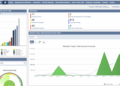
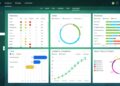
- Interactive Dashboards: Create customizable dashboards to visualize key metrics and KPIs in real-time.
- Ad Hoc Reporting: Generate ad hoc reports on the fly without the need for IT intervention.
- Data Integration: Connect and consolidate data from multiple sources for a unified view of your business.
- Collaboration Tools: Share insights and reports with team members for better decision-making.
- Mobile Access: Access reports and dashboards on the go from any mobile device.
Benefits of Using Sage Enterprise Intelligence
- Improved Decision-Making: With real-time insights and data visualization, businesses can make informed decisions quickly.
- Increased Efficiency: Automate reporting processes and reduce manual data manipulation, saving time and resources.
- Enhanced Data Accuracy: By consolidating data from various sources, organizations can ensure data integrity and accuracy.
- Better Collaboration: Foster collaboration and knowledge sharing among team members by easily sharing reports and insights.
Implementation of Sage Enterprise Intelligence
Implementing Sage Enterprise Intelligence involves several steps to ensure a successful deployment of the software. Below are the key steps and best practices to consider:
Planning and Preparation
- Define clear objectives and goals for implementing Sage Enterprise Intelligence.
- Allocate resources, including budget, time, and personnel, for the implementation process.
- Conduct a thorough assessment of your current data infrastructure and business processes to identify potential areas for improvement.
Installation and Configuration
- Install the Sage Enterprise Intelligence software on the designated servers or cloud infrastructure.
- Configure the software to integrate with your existing data sources, such as ERP systems, databases, and spreadsheets.
- Set up user permissions and access controls to ensure data security and compliance.
Training and Onboarding
- Provide comprehensive training to end-users on how to use Sage Enterprise Intelligence effectively.
- Offer ongoing support and resources to help users troubleshoot any issues or questions they may have.
- Encourage user adoption by showcasing the benefits and value of the software in day-to-day operations.
Testing and Quality Assurance
- Conduct thorough testing of the software to ensure all functionalities work as expected and meet the defined objectives.
- Perform quality assurance checks to validate data accuracy, system performance, and user experience.
- Iterate on feedback and make necessary adjustments to optimize the software for your specific business needs.
Go-Live and Monitoring
- Schedule a go-live date for the official launch of Sage Enterprise Intelligence within your organization.
- Monitor system performance, user feedback, and key performance indicators to track the success of the implementation.
- Continuously improve and refine the software based on user insights and evolving business requirements.
Integration with other systems
Integration with other systems is crucial for maximizing the efficiency and effectiveness of Sage Enterprise Intelligence. By seamlessly connecting with various enterprise systems, businesses can access a comprehensive overview of their operations and make informed decisions.
Popular Systems Integrated with Sage Enterprise Intelligence
- Enterprise Resource Planning (ERP) systems like SAP, Oracle, and Microsoft Dynamics
- Customer Relationship Management (CRM) systems such as Salesforce and Microsoft Dynamics CRM
- Accounting software like QuickBooks and Xero
- Supply Chain Management systems like JDA Software and Manhattan Associates
Advantages of Integration
Integrating Sage Enterprise Intelligence with other systems offers several advantages for streamlined business operations:
- Centralized Data: All relevant data from different systems is consolidated into one platform, providing a unified view for analysis and reporting.
- Real-time Insights: By integrating with systems that are constantly updated, businesses can access real-time insights to make timely decisions.
- Improved Efficiency: Automation of data transfer and synchronization reduces manual effort and minimizes errors in data processing.
- Enhanced Decision-making: Access to a comprehensive view of business operations enables better decision-making based on accurate and up-to-date information.
Customization and Reporting
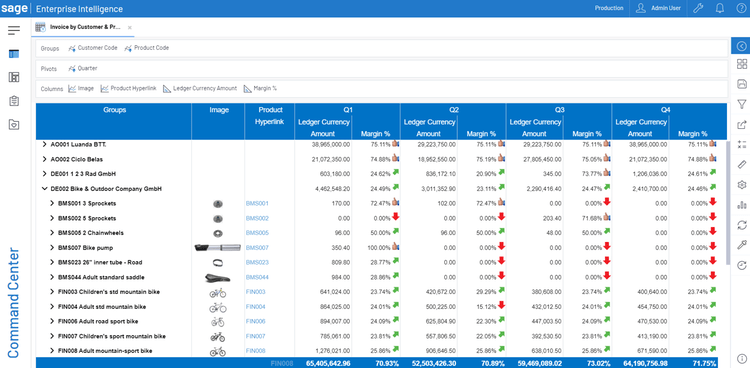
When it comes to customization and reporting in Sage Enterprise Intelligence, users have a range of options to tailor the system to their specific business needs and generate insightful reports.
Customization Options
- Users can customize dashboards and layouts to display information most relevant to their roles.
- Custom calculations and KPIs can be created to track specific metrics important to the business.
- Filters and prompts can be set up to allow users to analyze data based on their criteria.
- Customized alerts and notifications can be configured to keep users informed of important changes or trends.
Types of Reports
- Standard Reports: Pre-built reports are available for common business functions and industries.
- Ad Hoc Reports: Users can create on-the-fly reports by selecting data fields and criteria.
- Interactive Reports: Reports that allow users to drill down into data for deeper analysis.
- Scheduled Reports: Reports can be automated and delivered to stakeholders on a regular basis.
Tips for Creating Customized Reports
- Define clear objectives and desired outcomes for the report before starting the creation process.
- Collaborate with key stakeholders to understand their specific reporting needs and requirements.
- Utilize the drag-and-drop interface to easily add and arrange data elements in the report.
- Include relevant visualizations such as charts, graphs, and tables to present data in a meaningful way.
- Test the report with a sample dataset to ensure accuracy and relevancy before sharing with users.
Ultimate Conclusion
In conclusion, Sage Enterprise Intelligence stands as a powerful tool for modern businesses, propelling them towards informed decision-making and strategic growth. Embrace the possibilities that lie within this dynamic platform, and unlock a new era of business intelligence excellence.
Question & Answer Hub
How does Sage Enterprise Intelligence differ from other BI tools?
Sage Enterprise Intelligence offers a unique blend of features tailored for businesses of all sizes, providing a comprehensive solution for data analysis and reporting.
Is Sage Enterprise Intelligence suitable for small businesses?
Absolutely! Sage Enterprise Intelligence is designed to scale effectively, making it a versatile option for small businesses looking to enhance their decision-making processes.
Can Sage Enterprise Intelligence be integrated with cloud-based systems?
Yes, Sage Enterprise Intelligence offers seamless integration with popular cloud-based systems, ensuring smooth data flow and accessibility.
What kind of support does Sage provide for implementing Sage Enterprise Intelligence?
Sage offers comprehensive support and resources to guide businesses through the implementation process, ensuring a successful deployment of Sage Enterprise Intelligence.
Are there training resources available for learning how to use Sage Enterprise Intelligence?
Yes, Sage provides training resources and documentation to help users maximize their utilization of Sage Enterprise Intelligence's features and capabilities.